It takes 5 cloud services to hear my doorbell
It all started in the winter of 2024. There was a burglary in our apartment building and we decided we needed to invest in our home’s security. The obvious solution: a video doorbell!
I looked around and ended up buying a cheap Blink doorbell. It worked: we got video clips and everything! However, there was an annoying regression to our front door experience.
Before we had the doorbell, people just knocked on the front door. But now, people would notice the doorbell and ring it instead. This would send a notification to our phones, and then it would also helpfully play a sound on the doorbell itself… outside the door… which we could not hear. 😬
My wife does not keep her phone on her at all times because she isn’t chronically attached to technology like I am. This also meant that the doorbell didn’t really work for her and she didn’t realize when people were waiting at the door after ringing the doorbell. I remember her telling me: “This is really stupid, Vivek. Adding a doorbell has made it harder to open the door for guests.” She was right. This was very embarrassing. I had to fix this.
We already have some Google Home minis at home, so I thought: easy, I’ll just play a sound on those when the Blink doorbell rings. Nope, not easy. My two self-inflicted constraints were: I didn’t want to pay for any subscriptions, and I didn’t want to expose my home mini PC to the internet.
After a few days of digging around for answers (I even asked gpt-4o, but no luck), I came up with an, ahem, incredible Rube Goldberg machine setup for this doorbell. What happens now is:
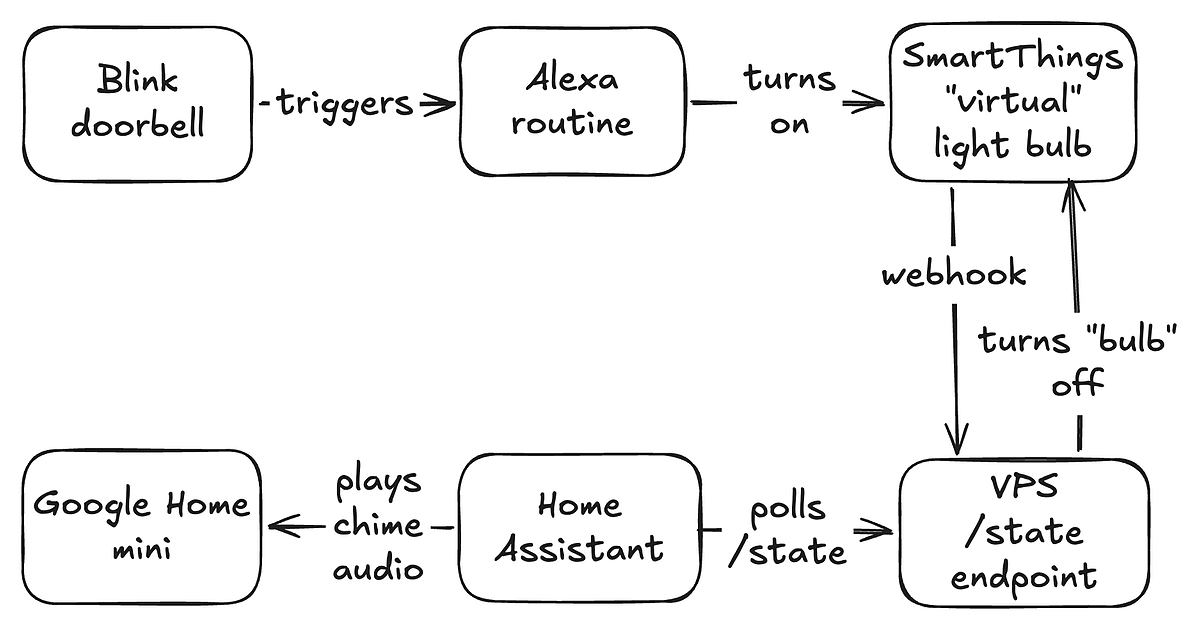
- When the Blink doorbell rings, it triggers an Alexa routine.
- The Alexa routine turns on a virtual light bulb in the Samsung SmartThings platform. It’s 1 bit of information in the cloud that Alexa can toggle.
- SmartThings sends webhooks whenever the state of the virtual light bulb changes. (more on this later)
- A VPS hosts a tiny server. This server listens to the webhooks, and exposes an endpoint that reports whether the “light” was turned on, and then turns off the “light”.
- My mini PC at home has a Home Assistant routine that polls the server endpoint. When its status changes from off to on, it plays an audio file on a Google Home mini.
Sure, this is over-engineered, but it really does work, and has worked for ~18 months now!
There is one annoying recent development, though: Samsung recently announced that personal SmartThings API access will cost $4.99/month. Given that its whole job is to store a boolean in the cloud, I’m going to have to figure out another way to keep running this contraption.
And that’s the story of how I upgraded my flat’s front door experience from depending on 0 cloud services to 5 cloud services.